
Color Sync Mode
Color Sync is a premium feature that synchronizes the screen color on a guest’s phone with your Operation Hub while they are being called. Staff can confirm who is being called simply by looking at the screen—no need to read numbers aloud or verify names one by one.
It is especially useful in crowded venues and when calling multiple guests at once, because everyone shares the same color signal at the same time.
Key Benefits
See who is being called at a glance
While a guest is being called, a color frame appears on their phone and the same color appears on your Operation Hub. Ask the guest to show their screen, and staff can immediately confirm they are being called.
Handle simultaneous calls with ease
When you call multiple guests at once, each group gets a different color. Even during peak hours or large events, staff can quickly tell which guest belongs to which call.
Same color for everyone in a group
If a family or group is waiting on multiple phones, every screen in that group switches to the same color at the same moment. No one in the group is left behind.
Random colors help prevent fraud
Colors are assigned from a randomized sequence, and they shift over time. This makes it hard to fake a call with an old screenshot or a homemade screen. If the colors match right now, the call is happening right now.
Where It Helps
- On a busy weekend, staff look for the phone showing the same color as the Hub and find the right guest in seconds.
- A family splits up while waiting. When their turn comes, every phone in the group shows the same color, wherever they are.
- In a loud food court where announcements are hard to hear, the color reaches the right person without extra shouting.
Screenshots

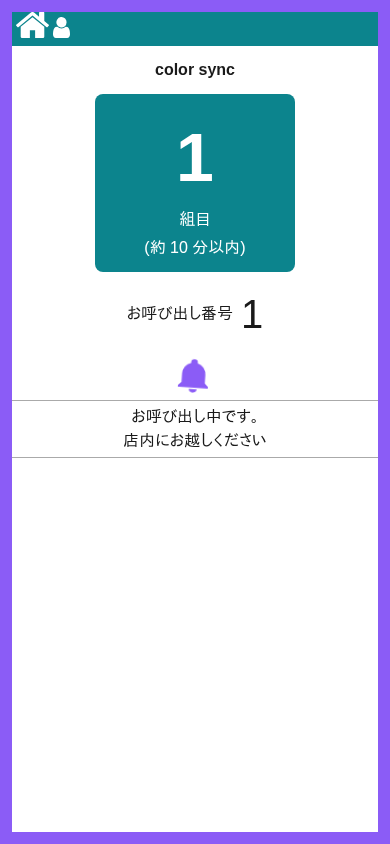
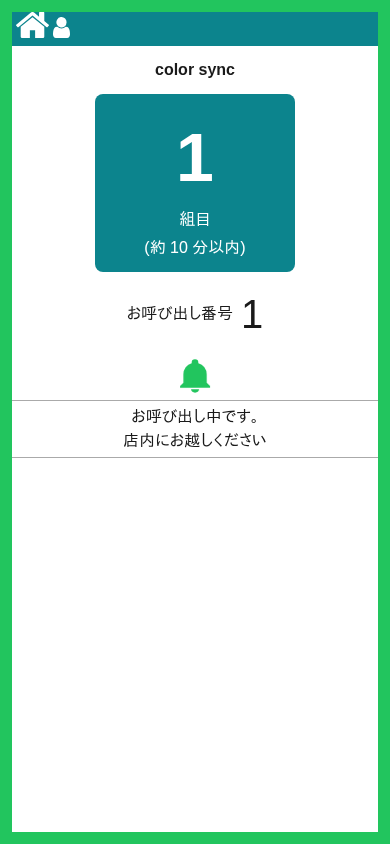
How to Set Up
You can enable Color Sync in a few steps.
- Activate your premium plan.
- Open your line settings and find “Color Sync” under the calling display section.
- Turn it on. When Color Sync is enabled, the calling display pattern switches to “Text only.” Note that Color Sync can only be switched on while no guests are waiting in line, so flip the switch after everyone has been guided.
Premium Feature
Color Sync is included in the Junban premium plan, along with notifications, custom app colors, and more. It is built for busy storefronts where every call needs to be handled quickly and accurately.
Summary
Color Sync turns “who is being called right now?” into a question you can answer by looking at a screen. Less confusion for guests, faster checks for staff, and stronger protection against queue fraud.